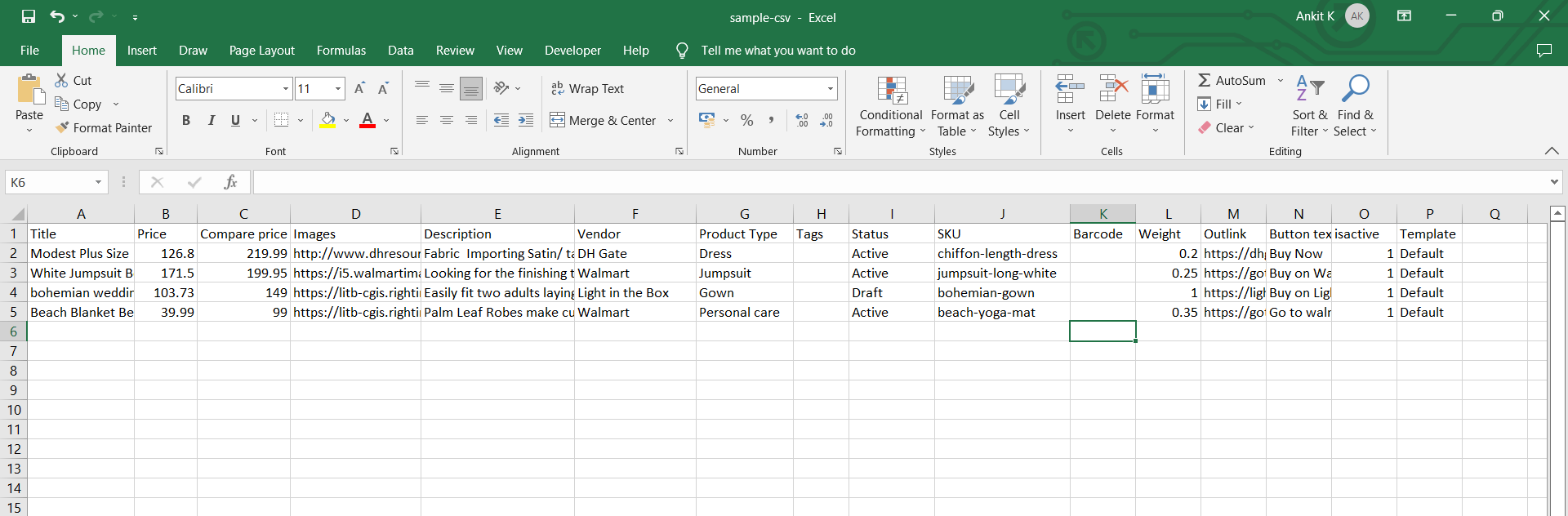
Before importing products, prepare your data in a CSV or Excel spreadsheet using the supported column headers.
The app will import or update products based on the information provided in your file. Including the correct column names and values helps ensure a smooth import process.
Supported File Formats
The following file formats are supported:
- CSV (.csv)
- Excel (.xlsx)
Supported Column Headers
Your spreadsheet can include the following columns:
| Column | Description |
|---|---|
Title | Product title. |
Price | Selling price of the product. |
Compare Price | Original or compare-at price. |
Images | Product image URL(s). |
Description | Product description. |
Vendor | Product vendor or brand. |
Product Type | Product category or type. |
Product Tags | Tags assigned to the product. |
Status | Product status (Active, Draft, etc.). |
SKU | Product SKU used to identify the product. |
Barcode | Product barcode. |
Weight | Product weight. |
Outlink | External or affiliate URL associated with the product. |
Button Text | Text displayed on the Outlink button. |
isactive | Enables or disables the Outlink ( |
Template | Product template to assign during import. |
Tip
Use the exact column names shown above to ensure the app correctly maps your product data during import.
Here is a sample CSV.