The URL Parameters feature allows you to automatically append custom parameters to your Outlinks before customers are redirected to the destination website.
URL parameters are commonly used for campaign tracking, affiliate reporting, and analytics, helping you measure where your traffic and clicks are coming from.
What Are URL Parameters?
A URL parameter consists of a key and a value, separated by an equals sign (=). Multiple parameters are joined using an ampersand (&).
Example:
https://example.com/product?utm_source=google&utm_campaign=summer_sale
In the example above:
- utm_source =
google - utm_campaign =
summer_sale
These parameters are passed to the destination website and can be used by analytics and marketing platforms to track visitor activity.
How to Add URL Parameters
Step 1: Open URL Parameter Settings
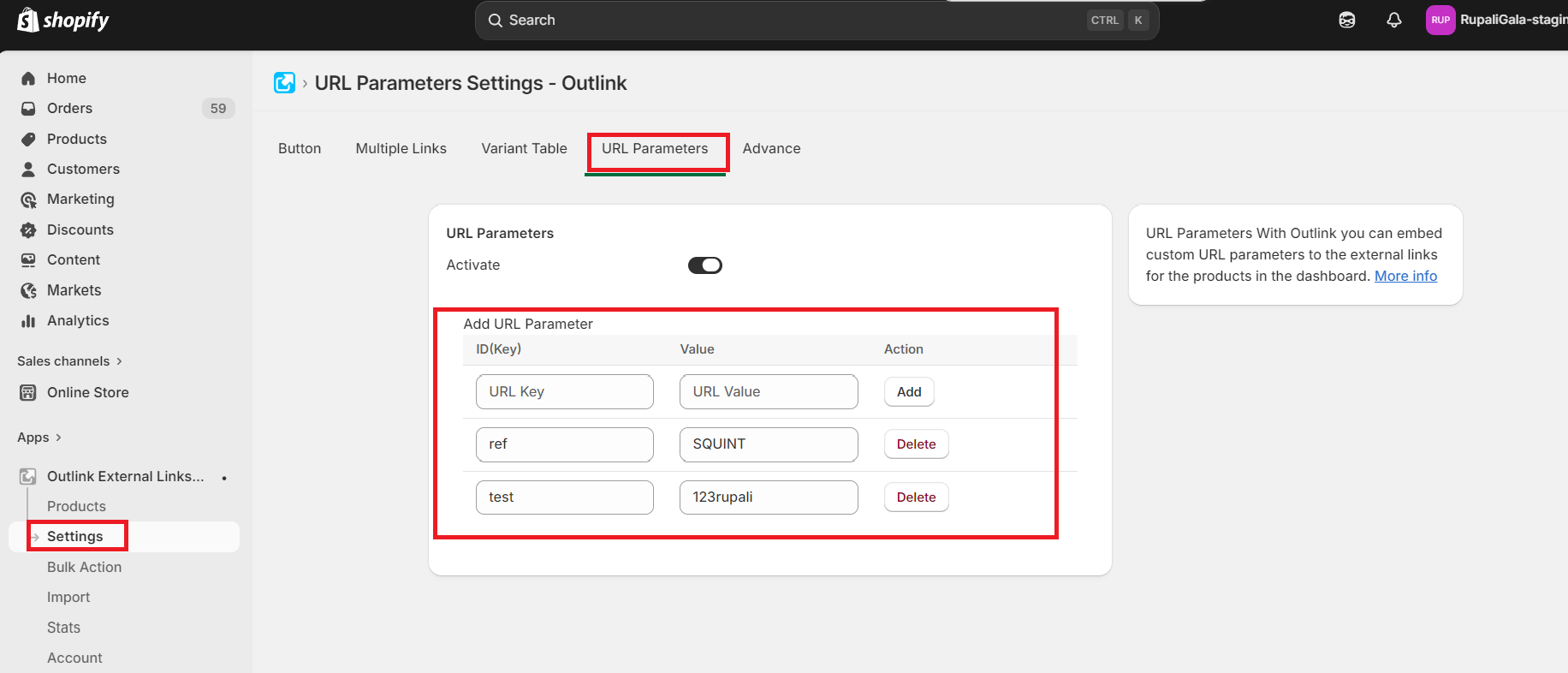
From the Outlink Dashboard, navigate to: Settings → URL Parameters
Step 2: Add Your Parameters
For each parameter, enter:
- Key – The parameter name (for example,
utm_source). - Value – The value associated with the parameter (for example,
newsletter).
You can add multiple URL parameters as needed.
Step 3: Save Your Changes
Click Save to apply your settings.
From this point onward, the configured URL parameters will automatically be appended to your Outlinks whenever customers click the Outlink button.
How It Works
When a customer clicks an Outlink:
- The app retrieves the configured external link.
- Your configured URL parameters are appended to the URL.
- The customer is redirected to the destination using the updated URL.
This allows your analytics, affiliate, or marketing platform to receive additional tracking information with every click.
Important Notes
Plan Availability
URL Parameters are available on the Pro plan and above.
Feature Disabled
If the URL Parameters feature is turned off, customers will be redirected using the original external link without any additional parameters.
App Dependency
If the Outlink app is uninstalled, URL Parameters will no longer be appended to your external links.