The Multi-Region Support feature ensures that product prices are automatically displayed in the visitor's local currency, providing a more personalised and seamless shopping experience for customers across different regions.
⚙️ How It Works
🌐 When a visitor accesses your Shopify store, Shopify Markets automatically detects their location (if enabled) and displays product prices in their local currency.
For example:
- 🇬🇧 A visitor from the United Kingdom will see product prices in Pounds (£).
- 💷 If they subscribe to a price drop alert, both their target price and any price drop notifications will also be displayed in Pounds (£).
📊 Dashboard Experience
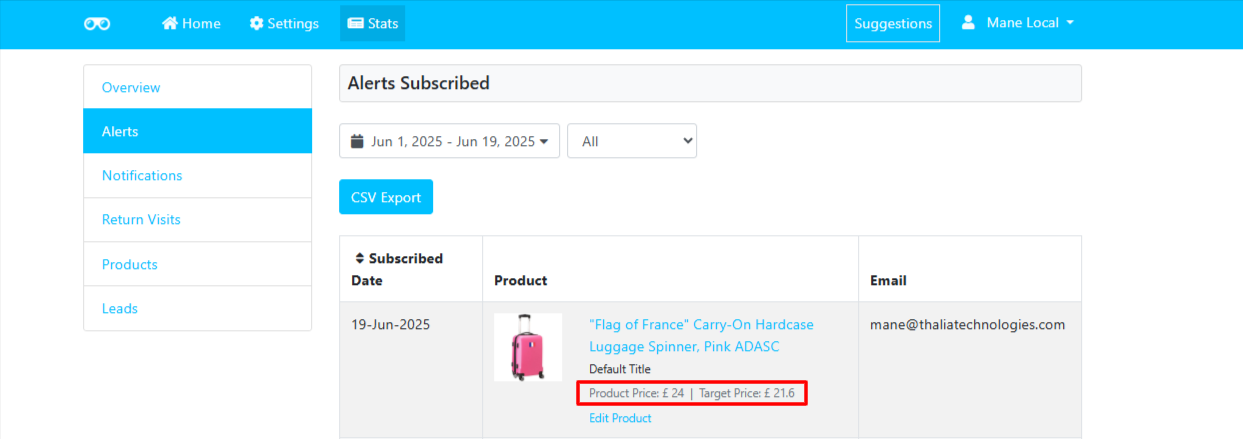
Within the Watchlyst Dashboard, subscription statistics and price alert data are displayed in the same local currency used by your customers.
This allows you to:
- 📈 View subscription trends by region.
- 💷 Analyse target prices in the customer's local currency.
- 🌍 Better understand global demand across different markets.
- 🎯 Make more informed pricing and promotional decisions for international customers.
✅ Benefits of Multi-Region Support
- 🌎 Automatically displays prices in the visitor's local currency.
- 💷 Provides a consistent experience from storefront to email notifications.
- 🛍️ Enhances the shopping experience for international customers.
- 📊 Helps merchants analyse customer interest across multiple Shopify Markets.
📌 Important Notes
- 🛒 This feature requires Shopify Markets to be enabled on your Shopify store.
- 💎 Multi-Region Support is available only on the Basic plan.
- 💱 The currency displayed in price alerts and the Watchlyst dashboard is determined by the customer's Shopify Market and selected currency.