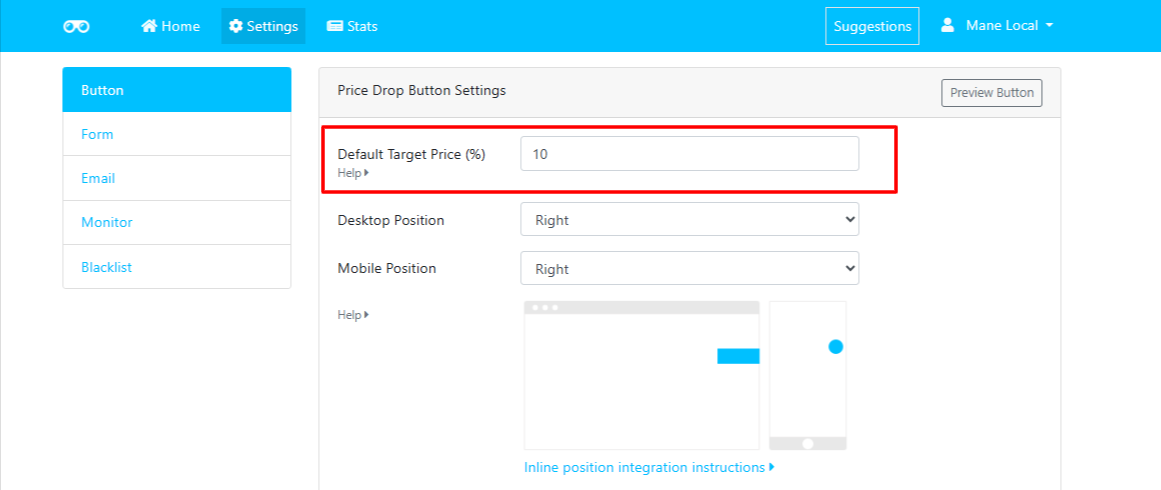
The Default Target Price (%) setting allows you to define the default price drop percentage that is pre-filled when customers subscribe to a price drop alert.
This makes it easier for customers to set their desired target price while giving you control over the default value displayed on your Shopify storefront.
⚙️ How It Works
By default, Watchlyst sets the Target Price to 10% below the current product price.
📌 Default Value
- Default Target Price: 10%
The app automatically calculates the target price using the percentage you specify.
💡 Example
If a product is priced at $100:
- 💲 Current Price: $100
- 📉 Default Target Price (10%): $90
When the customer opens the Price Alert form, the target price field will be pre-filled with $90.
✨ Customise the Default Percentage
You're not limited to the default 10% value.
You can set any percentage that best suits your store's pricing strategy, such as:
- 📉 5%
- 📉 10%
- 📉 15%
- 📉 20%
- ...or any other percentage of your choice.
🚀 How to Change the Default Target Price
- Open Shopify Admin.
- Navigate to Apps → Watchlyst – Price Alerts.
- Go to Settings → Button → Price Drop Button Settings.
- Locate the Default Target Price (%) field.
- Enter your preferred default percentage.
- Click Save to apply your changes.