There may be situations where you don't want Amazon tracking links to be added to Shopify orders. This is especially useful for orders imported from third-party sales channels, such as eBay, where tracking updates are managed separately.
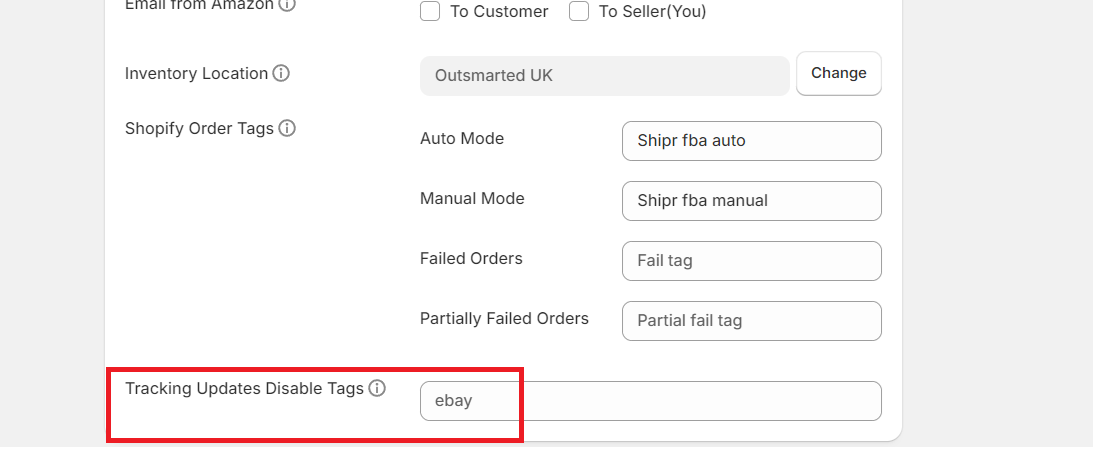
Shipr allows you to disable tracking URL updates for specific orders by using Order Tags.
How It Works
Shipr checks the tags assigned to each Shopify order before updating tracking information.
If an order contains a blacklisted order tag, Shipr will:
- Skip updating the Amazon tracking URL.
- Skip adding tracking information to the Shopify order.
- Continue processing the fulfillment normally (if applicable).
Configure Tracking URL Blacklisting
- Open the Shipr Dashboard.
- Navigate to the Order Tag Blacklist settings.
- Add one or more order tags that should prevent tracking URL updates.
- Save your changes.
Any order containing one of the configured tags will be excluded from tracking URL updates.
Common Use Cases
Use this feature when:
- Orders originate from third-party marketplaces (such as eBay).
- Tracking information is managed by another fulfillment system.
- You do not want Amazon tracking links shared with customers.
- You need different tracking workflows for specific orders.
Important Notes
- Only tracking URL updates are disabled.
- Eligible orders can still be fulfilled through Amazon FBA.
- The feature works based on Shopify Order Tags.
Tip: Apply a consistent order tag (for example, eBay, Marketplace, or No Tracking) to automatically exclude those orders from receiving Amazon tracking link updates.