Connecting your Amazon Seller Account to Shipr is a quick two-step process.
Step 1: Find Your Seller ID (Merchant Token)
- Log in to your Amazon Seller Central account in https://sellercentral.amazon.com/

- Navigate to Settings → Account Info.
- Under the Business Information section, click Merchant Token.

- Copy your Merchant Token (Seller ID).

Step 2: Authorize Shipr
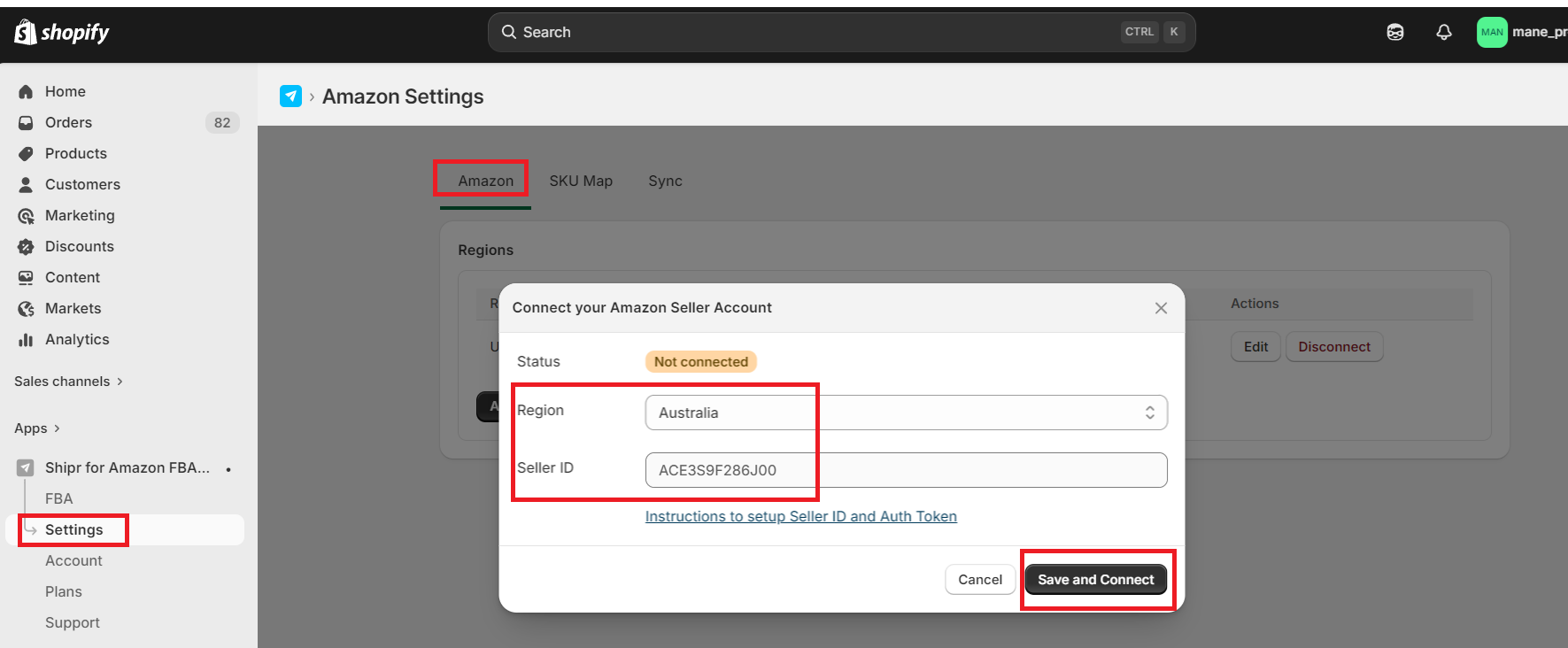
- Open the Shipr app in your Shopify Admin.
- Navigate to Amazon → Settings.
- Select your Amazon region.
- Paste the Merchant Token (Seller ID) you copied in Step 1.
- Click Save & Connect.
An Amazon authorization window will open.
- Review the requested permissions.
- Click Authorize to grant Shipr access to your Amazon Seller account.
Once the authorization is complete, your Amazon Seller Account will be successfully connected to Shipr.
Tip: Make sure you're signed in with the correct Amazon Seller Central account before authorizing Shipr. If the authorization window doesn't appear, check that your browser isn't blocking pop-ups.