Export your Shopify product data to a CSV file with just a few clicks. You can choose exactly which product fields to export and either download the file immediately or schedule the export for later.
Export Products
- Open the Data Exporter app.
- Click New Export.

- Select the product/variant fields you want to include in the CSV.


4. Next step is to select the products that you want to edit. You can select more than one condition and Click 'Next'. 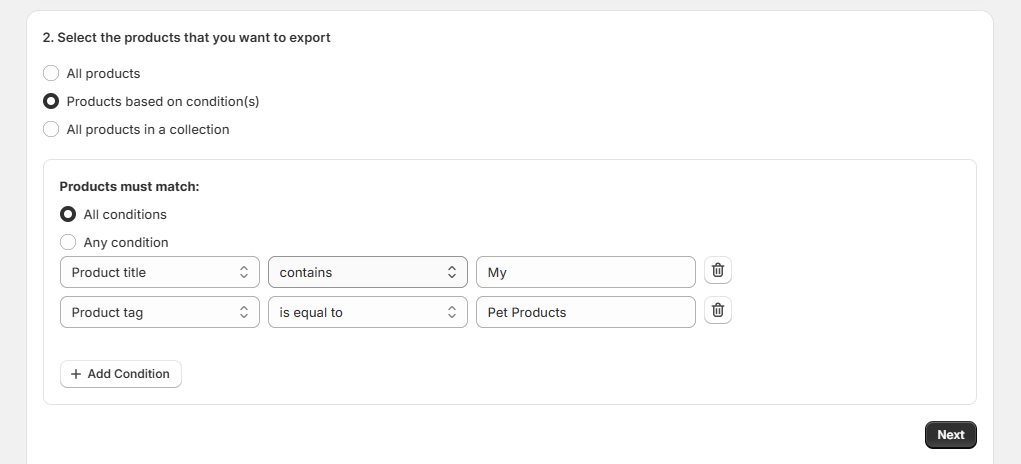
5. Review the number of matching products.
6. Finally, provide the export name and enter the email ID and Click Export Now to generate the CSV immediately, or schedule the export for a later time.

The app will then send you the CSV file to the email address you provided, wherein you can then download the file.
Download the Export
Once the export is complete:
- A download link will be sent to the email address(es) you provided.
- The export will also be available in the app dashboard under Export History.

Notes
Download Link Expiry
Export download links remain active for 24 hours. Download the file before it expires.
Metafield Export
The app can export product metafields from your current Shopify store. However, Shopify does not support importing exported metafields into another store using the same CSV.
Automatic Cleanup
Export logs and generated CSV files are automatically removed 24 hours after they are created.
Tips
- Export only the fields you need to keep your CSV clean and easy to manage.
- Use product filters to export specific collections, vendors, tags, or product types.
- Schedule exports if you need regular product backups or reports.